How DNS Resolution Works: What Happens Before a Website Loads

You type google.com and press Enter. Before a single byte of the page arrives, your computer has to answer one question: where is google.com?
Computers don’t understand names. They understand IP addresses like 142.250.x.x. DNS is the system that translates one into the other, and in this blog we’ll watch it work, live, using a tool called dig.
What is DNS and Why Does It Exist?
DNS (Domain Name System) is the internet’s phonebook. You remember names, but computers need numbers. DNS looks up the name and returns the number.
Imagine if you had to memorize an IP address for every website you use. DNS exists so you never have to.
What is dig?
dig is a command-line tool that lets you ask DNS questions and see the raw answers. Developers use it to debug problems like “my domain isn’t loading” or “I changed my DNS settings, did it work?”
Think of it as a flashlight for DNS: normally the whole process is invisible, and dig lets you see inside.
DNS Works in Layers
No single server knows every website. Instead, DNS is a hierarchy with three levels:
Root → TLD → Authoritative
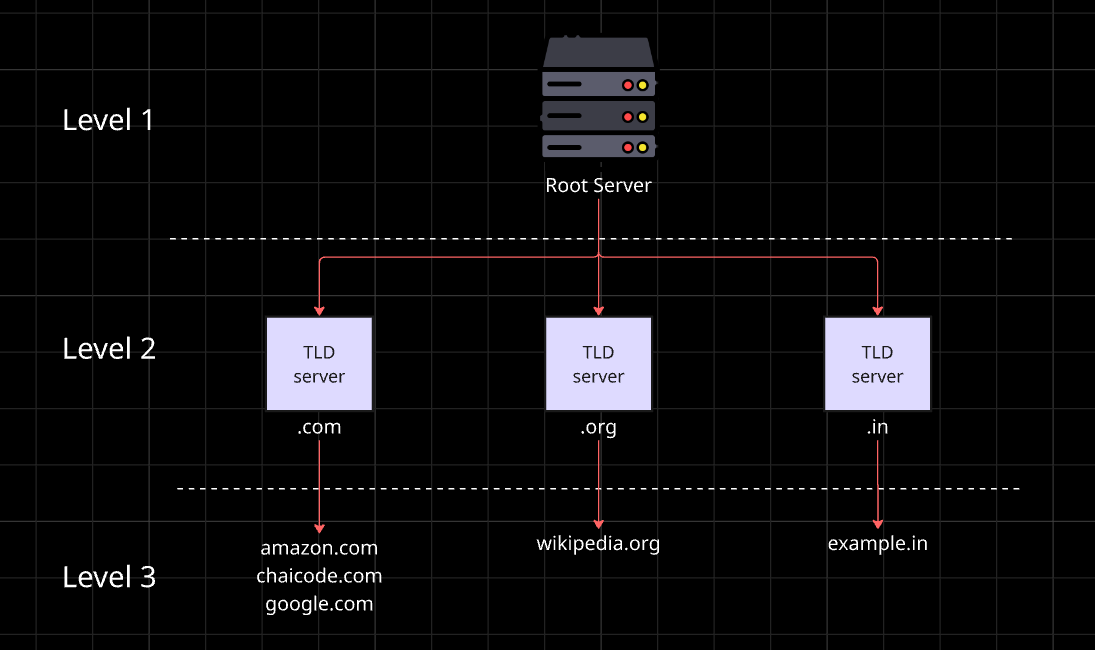
Each level only knows who to ask next. It’s like asking for directions: the first person says “go to that town,” the next says “go to that street,” and the last one points at the exact house.
Let’s walk through each layer with dig.
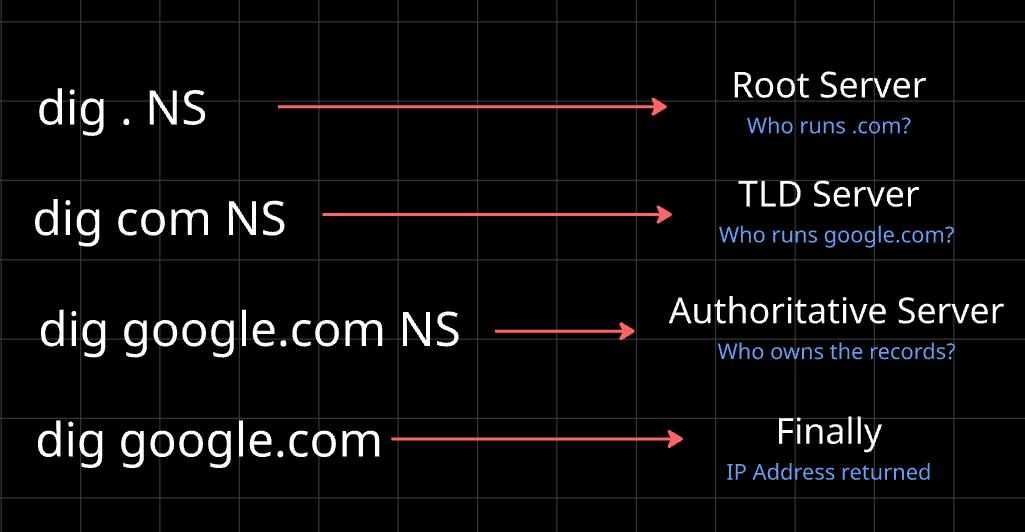
Layer 1: Root Name Servers (dig . NS)
dig . NS
The single dot . represents the root of the internet. This command asks, “Who are the root name servers?”
The answer is a list of 13 named servers, a.root-servers.net through m.root-servers.net. (Each name is backed by many machines around the world, so there are far more than 13 physical servers.)
NS records (Name Server records) simply say “these servers are responsible for this zone.” That’s what you’re seeing here.
The root servers don’t know where google.com is. They only know who handles .com, .org, .net, and the rest.
Layer 2: TLD Name Servers (dig com NS)
dig com NS
TLD stands for Top-Level Domain, like .com. This command asks, “Who manages everything ending in .com?”
You’ll get servers like a.gtld-servers.net. These servers don’t know google.com’s IP either, but they know which servers are in charge of google.com.
Layer 3: Authoritative Name Servers (dig google.com NS)
dig google.com NS
Now we’re at the last level. The answer lists servers like ns1.google.com through ns4.google.com. These are the authoritative servers, the ones Google itself controls. They hold the real, final answer.
This is why NS records matter: when you buy a domain and point it to a hosting provider, you’re setting its NS records, telling the world who is in charge of your domain.
The Full Flow (dig google.com)
dig google.com
Now we ask the real question. In the output, look at the ANSWER SECTION. You’ll see an A record: google.com and its IP address. Next to it is a number called TTL (time to live), which tells caches how many seconds they can remember this answer.
But how did we get that answer without visiting each server by hand? That’s the job of the recursive resolver.
The Recursive Resolver: Your Personal Assistant
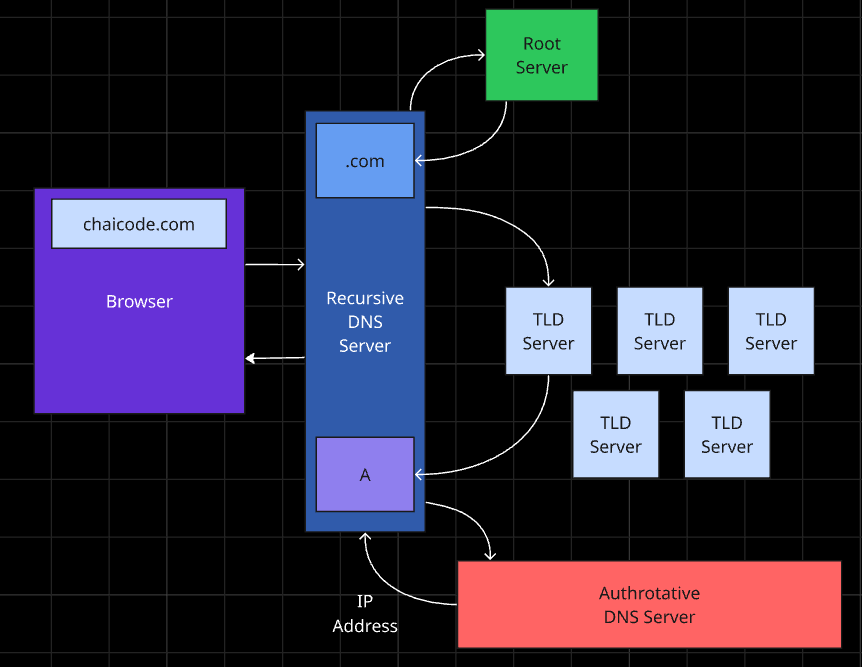
When your browser needs an IP, it asks a recursive resolver (usually run by your ISP, or something like 8.8.8.8). The resolver does all the legwork:
Asks a root server: “Where is google.com?” → “Ask the .com servers.”
Asks a TLD server: “Where is google.com?” → “Ask ns1.google.com.”
Asks the authoritative server: “Where is google.com?” → “Here’s the IP.”
Returns the answer to your browser and caches it for the TTL.
Because of caching, most lookups skip these steps entirely and finish in milliseconds.
Connecting It to Your Browser
Here’s the real-world order of events when you open a website:
The browser checks its own cache.
If it’s not there, it asks the recursive resolver.
The resolver finds the IP through root → TLD → authoritative (or its cache).
The browser connects to that IP and loads the page.
DNS is step zero of every request. If it fails, nothing else happens, which is why “DNS issue” is a classic cause of “the site is down.”
Why This Matters for Engineers
Once you understand DNS, many mysteries get easier: why changes to your domain take time to spread (caching and TTL), why a site works on one network but not another (different resolvers), and why DNS providers are such a critical part of system design.
Wrapping Up
DNS translates names into IPs through layers: root points to TLD, TLD points to authoritative, and the authoritative server gives the final answer. The recursive resolver does the work for you, and dig lets you watch it happen.
Comments
Join the discussionNo comments yet. Be the first to comment.
Networking Basics
How does the internet actually reach your code? This 6-part beginner series covers network devices, DNS, DNS records, TCP, TCP vs UDP, and hands-on testing with cURL.